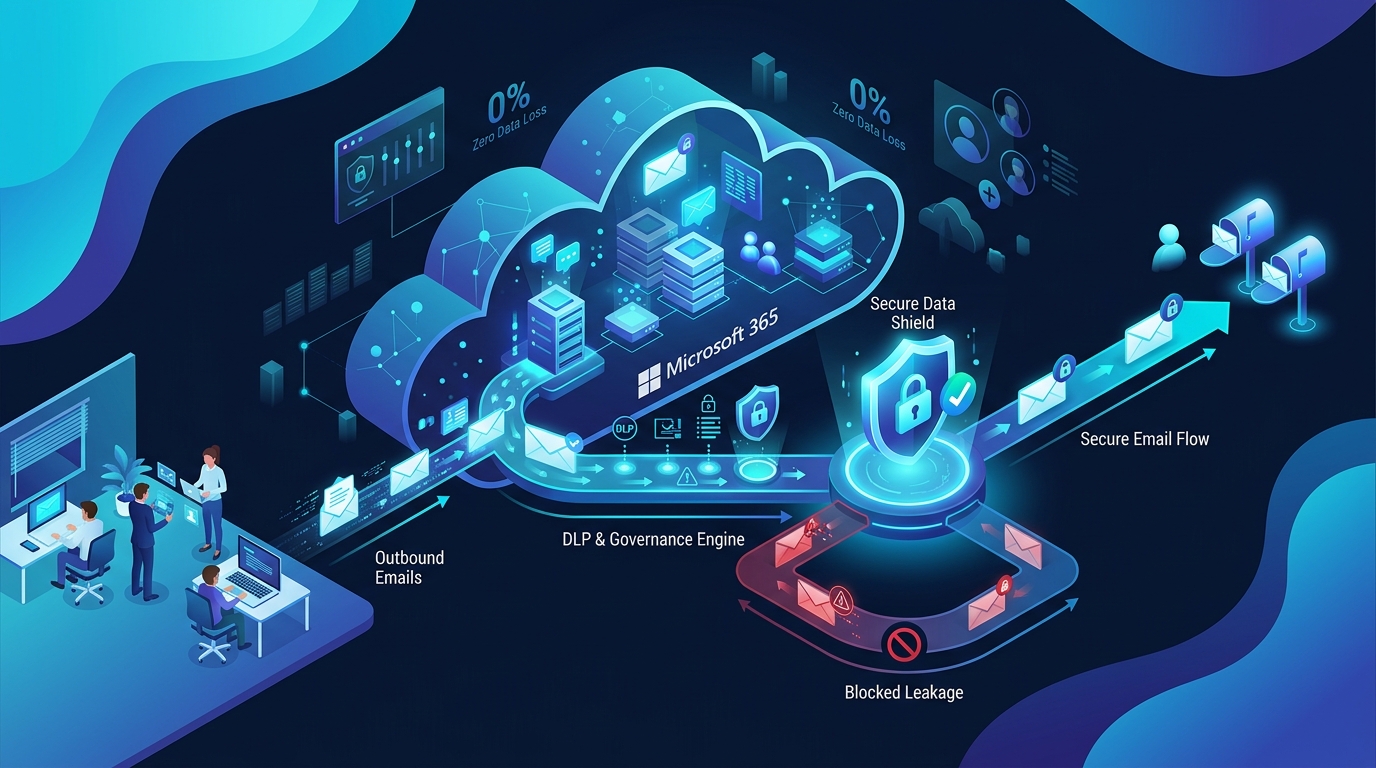
To prevent data leakage through email, combine five layers:
- (1) Classify and detect sensitive data before it is sent
- (2) Stop wrong-recipient and reply-all errors with send-time checks
- (3) Block auto-forwarding to personal accounts
- (4) Enforce outbound policies that read context, not just keywords
- (5) Keep an audit trail so every incident can be investigated
Native Microsoft 365 controls cover part of this. The gaps are usually in context, human error and reporting.
⚡ Key Takeaways
- Most email data leaks are accidental, not malicious: wrong recipients, reply-all, wrong attachments and auto-complete errors account for the vast majority of incidents.
- Outbound email is the blind spot: Most cybersecurity budgets heavily prioritize inbound perimeter defenses (anti-phishing, malware filters), leaving outbound information flows under-defended.
- Keyword-based DLP produces false positives and still misses real leaks. Context-aware, semantic AI policies work much better.
- Microsoft 365 and Exchange Online give you the building blocks, but they have known structural limits (rule ceilings, propagation delays, regex blind spots).
- A realistic programme combines policy, technology, training and audit: No single tool or toggle is sufficient on its own.
What Is Email Data Leakage?
Email data leakage is the unauthorised or accidental transfer of sensitive information out of an organisation through email. The data can be customer records, financial details, health information, contracts, credentials or intellectual property. It can leave in the message body, in an attachment, or in a forwarded thread.
It is fundamentally different from a traditional data breach, which usually means an external cyberattacker compromised a system. A data leak can happen with no attacker at all: one employee, one click, one wrong autocomplete selection.
Verified Industry Statistic: According to official incident reports from the UK Information Commissioner's Office (ICO), misdirected emails (data emailed to the wrong recipient) consistently account for over 65% of all non-cyber personal data security incidents—outnumbering lost paperwork, stolen laptops, and physical disposal errors combined.
Why Email Is Still the Biggest Data Leak Risk
Email remains the most common channel for sharing business information, which makes it the most common channel for losing it. Three persistent factors keep it vulnerable:
- Volume: Large organisations send millions of messages a month. Even an error rate of 0.01% translates to dozens of regular disclosure incidents each quarter.
- No undo button: Once an outbound email reaches an external mail server, it cannot be reliably recalled. Native Exchange recall only functions within the same tenant if unread.
- Blind spots: Security teams monitor inbound threats closely. Outbound email security risks get far less operational attention until a major disclosure forces an executive post-mortem.
For regulated industries, the stakes are severe. A single misdirected email can trigger mandatory breach notifications under GDPR, HIPAA, or FINRA rules, and it can directly compromise cyber liability claims. See our detailed guide on cyber insurance and email: what's excluded when an employee makes a mistake.
The 7 Most Common Ways Data Leaks Through Email
Understanding exactly how leaks happen is the first step toward implementing proactive defenses:
- Misdirected emails (wrong recipient): Outlook's auto-complete algorithm suggests the wrong "Sam" or "Priya," and a confidential board paper or payroll sheet goes to an outsider with a similar name or domain. This remains the single most common cause of accidental data disclosure via email.
- Reply-all mistakes: A sensitive reply containing negotiation leverage or private client feedback reaches an entire distribution list, including external participants or cc'd partners. Reply-all errors in enterprise environments trigger both legal exposure and brand embarrassment.
- Wrong or unredacted attachments: The right email goes out, but with the wrong draft attached—or an Excel spreadsheet containing hidden columns, pivot cache data, tracked revisions, or metadata still inside.
- Insider risk and malicious exfiltration: A departing employee emails client databases, confidential pricing spreadsheets, or source code to their personal inbox or to a future competitor. While less frequent than accidents, insider incidents usually carry far higher financial damages.
- Auto-forwarding to personal accounts: Inbox forwarding rules quietly forward corporate communications to a personal Gmail or Outlook address so an employee can "work from home." This is a classic form of shadow IT. Read more in Detecting Shadow IT Before It Becomes a Breach: An Email-First Approach.
- Compromised accounts: An attacker armed with credential-stuffed logins creates hidden inbox rules to monitor, copy, and exfiltrate financial correspondence. Because the mail originates from a valid mailbox, it looks identical to normal employee behavior.
- Over-sharing in long email threads: Lengthy conversation threads accumulate historic attachments, internal commentary, customer contact details, and strategy deliberations. Forwarding that chain to a new third-party contractor exposes the entire historical transcript below the latest message.
The Five-Layer Email Prevention Model
Traditional perimeter defenses fail because outbound email leaks require controls tailored to human behavior, content semantics, and regulatory workflows. Here is the modern 5-layer prevention architecture:
Continuous semantic analysis scans message bodies, attachments, and thread histories for PII, PHI, financial records, and confidential project tokens.
Proactive UI prompts in Outlook/M365 intercept wrong autocomplete recipients, verify external look-alike domains, and warn when reply-all exceeds safe recipient counts.
Automated blocking of outbound auto-forwarding rules to external freemail domains (Gmail, Yahoo, Outlook.com) with real-time SOC alerting on rogue inbox rules.
Dynamic policy evaluation that looks beyond regex keywords: enforces encryption, strips sensitive metadata, isolates unauthorized attachments, or routes for manager review.
Immutable logging of policy evaluations, overrides, recipient validation, and message hashes to furnish instant proof for compliance audits and legal discovery.
How to Prevent Data Leakage Through Email: 9 Controls That Work
A balanced security posture implements these nine practical controls across people, process, and technology:
1. Know what sensitive data you have
Start by establishing clear organizational definitions for what "sensitive" means in your environment: customer PII, payment card numbers, patient records, legal correspondence, executive pricing sheets, or source code. Without a clear classification taxonomy, automated tools cannot apply accurate controls.
2. Use email DLP, but know its limits
Email data loss prevention (DLP) scans outbound messages and attachments for patterns such as credit card numbers or government IDs to block, warn, or encrypt. DLP is essential, but rigid pattern matching alone creates high false-positive noise and misses nuance. For a deeper analysis, read Why Basic Office 365 DLP Fails at Context (and How Semantic AI Fixes It) and Outbound Email DLP vs Email Governance: What's the Difference?.
3. Add send-time warnings for external recipients
A lightweight, contextual prompt such as "You are sending confidential internal files to an external domain. Continue?" stops up to 80% of misdirected autocomplete mistakes. Pair this with real-time recipient domain checks that flag look-alike typographical errors (e.g., partner-compnay.com vs partner-company.com).
4. Limit reply-all and large distribution lists
Enforce recipient-count thresholds that trigger an explicit warning or require approval before a user can email 50+ recipients. Restrict write permissions on all-company and cross-departmental distribution groups so that only authorized personnel can broadcast to them.
5. Block or control auto-forwarding
Disable automatic external forwarding at the tenant outbound spam policy level, and configure real-time alert rules for any newly created inbox rules that forward mail outside the corporate boundary. Conduct scheduled reviews of forwarding rules for offboarding and departing employees.
6. Enforce encryption and access controls
Deploy automated message encryption for regulated content (financial records, medical data, legal notices). Apply Microsoft Purview or MailGovern sensitivity labels so that encryption and permission controls remain active on the document even after it leaves the mailbox.
7. Automate governance, not just detection
Detection only alerts you that something went wrong. Governance determines what should happen in real-time: route the message to a compliance manager, quarantine it, dynamically strip hidden metadata, inject legal disclaimers, or request send-time verification. For an end-to-end guide, see Beyond Basic Transport Rules: Setting up Automated Mail Governance.
8. Train people with real near-miss examples
Annual security awareness slideshows fail to change behavior. Training works best when it is delivered in bite-sized, frequent intervals using real, sanitized near-misses from your own organisation: misdirected emails, reply-all incidents, and disguised phishing forwards.
9. Keep a defensible audit trail and test it
In the event of an investigation or regulatory examination, you must be able to prove who sent what, to whom, which policy was evaluated, and whether any user override occurred. A defensible record protects the organization during litigation and legal hold. See Email Audit Trail for Legal Hold: What 'Defensible' Actually Means.
Microsoft 365 and Exchange Online: Where Native Controls Fall Short
Microsoft 365 offers robust tools—Exchange transport rules, Purview DLP, sensitivity labels, and Unified Audit Logs. However, IT and compliance teams frequently hit four major native limitations:
- The 300 Transport Rule ceiling: Exchange Online restricts tenants to a maximum of 300 mail flow rules. Enterprise teams managing multi-jurisdiction compliance and complex routing quickly exhaust this limit. See How to Bypass the 300 Transport Rule Limit in Exchange Online.
- Limited contextual intelligence: Native rules match simple regex patterns and keywords. They cannot understand sender-recipient conversational history, intent, or nuanced context, leading to massive alert fatigue.
- Unaddressed human error: Native Exchange features offer little help for autocomplete slips, look-alike recipient typos, or accidental reply-all storms.
- Fragmented reporting and propagation delays: Evidence is scattered across multiple administration portals, and policy changes in Purview can take hours or days to propagate across global tenants.
For a complete breakdown of blind spots, read Exchange Online Compliance Gaps Most IT Teams Don't Know They Have. If you are comparing compliance architectures, explore Microsoft Purview Alternative: What to Look for in an Email Governance Platform.
Compliance: What Regulators Expect from Your Email Controls
Different regulatory bodies oversee specific facets of the email lifecycle, but all require demonstrable, defensible controls:
Operating across multiple regulatory regimes? Consult our comprehensive technical guide: FINRA vs. HIPAA: A Technical Checklist for Email Governance in 2026 to align your configuration across both standards.
A 30-Day Action Plan for IT and Compliance Teams
Rolling out an email leak prevention program does not require an overhaul overnight. Follow this structured 4-week roadmap:
Audit Current Baseline
Audit existing auto-forwarding inbox rules, external sharing settings, transport rules, and native DLP policies. Pull 30 days of outbound mail logs and analyze common disclosure anomalies.
Secure the Basics
Disable automatic external forwarding tenant-wide. Enable external recipient send-time warnings in Outlook. Apply baseline DLP policies to your highest-risk data assets (PII and financial credentials).
Add Semantic Policies
Introduce governance policies that account for recipient relationship, domain reputation, attachment extensions, and conversation history. Set reply-all threshold limits on broad distribution lists.
Review and Audit
Set up automated reporting for blocked, warned, and overridden communications. Run a simulated tabletop exercise for a misdirected email incident. Tune false-positive rules based on audit logs.
Quick Deployment Checklist
- ☑ Sensitive data types defined, classified, and sensitivity labels published
- ☑ External recipient and look-alike domain warnings enabled at send time
- ☑ Outbound auto-forwarding to external addresses blocked in spam filter policy
- ☑ Real-time alerts configured for newly created user inbox forwarding rules
- ☑ DLP policies tested and tuned to eliminate employee alert fatigue
- ☑ Reply-all restrictions and large distribution list limits active
- ☑ Automated message encryption active for all regulated outbound content
- ☑ Centralized, searchable outbound audit trail retained and indexed
- ☑ Staff trained using real-world internal near-miss examples
- ☑ Standard operating procedure for accidental email disclosure documented
Frequently Asked Questions
What is the most common cause of email data leakage?
Human error. Misdirected emails caused by autocomplete selections, incorrect attachment versions, and accidental reply-all actions cause significantly more data leaks than deliberate insider theft or external cyber attacks.
How can I stop employees from sending confidential emails to the wrong person?
Deploy send-time confirmation warnings for external recipients, implement look-alike domain checks, and apply context-aware policies that flag sensitive content going to unfamiliar or newly added email addresses. Combine these technical safeguards with short, continuous training.
Is Microsoft 365 DLP enough to prevent email data leaks?
It is a strong starting baseline, but it relies heavily on regular expressions and keyword pattern matching. Many enterprises layer context-aware email governance on top of Microsoft 365 to dramatically reduce false positives and catch leaks that basic keyword rules miss.
What is the difference between email DLP and email governance?
Email DLP primarily detects and blocks specific sensitive patterns (like credit card numbers). Email governance covers the entire communication lifecycle: policy enforcement, routing, supervisory approvals, redaction, immutable retention, and defensible audit logging. Read our in-depth comparison in Outbound Email DLP vs Email Governance.
Can you recall an email sent to the wrong person?
Only under very narrow conditions: when both sender and recipient are on the exact same Microsoft Exchange organization and the recipient has not yet opened the message. For external recipients, email recall is technically impossible. Prevention at send time is the only reliable safeguard.
How do I stop auto-forwarding to personal email accounts?
Disable external automatic forwarding within your Exchange Online outbound anti-spam policy, configure alert policies for any newly generated forwarding rules, and regularly audit inbox rules for departing personnel.
How do I audit outbound emails?
Capture the sender, recipient, attachment metadata, classification tags, and policy enforcement decisions in a centralized, searchable log. Periodically review warned, blocked, and overridden communications to maintain compliance visibility.
Can employers monitor employee emails?
In most jurisdictions, yes, provided there is a legitimate business purpose, proportionate monitoring, and a transparent corporate acceptable use policy. Because privacy laws vary across regions (especially in the EU under GDPR), always consult legal counsel before enacting monitoring policies.
What should I do after an accidental email data disclosure?
Immediately execute containment steps: request the unintended recipient delete the email and confirm in writing, revoke access to any shared cloud document links, document the exact data disclosed, evaluate mandatory regulatory breach reporting duties (e.g., GDPR 72-hour notification), and conduct a post-mortem to determine why technical controls failed.
How long should we keep email for compliance?
Retention mandates vary by industry and jurisdiction: SEC broker-dealer communications require 3 to 6 years, SOX audit records require 7 years, while HIPAA requires retaining compliance documentation for 6 years. Start with our comprehensive guide on How Long Do You Have to Keep Business Emails?.
Final Thoughts: Closing the Outbound Governance Gap
Preventing data leakage through email is not about deploying a single rigid filter or writing another unenforced policy document. It is about closing the operational gap between what employees do every day and what security controls can see.
Start with the baseline controls, eliminate blind spots like auto-forwarding and autocomplete slips, introduce contextual AI policies, and retain a defensible record for every communication decision.
Ready to see how automated governance works on outbound Microsoft 365 email? Book a MailGovern technical demo or explore our native Exchange Online integration.